Managing your subscription
You can manage your subscription at any time through your account settings; including cancellations, renewals, and plan changes. This article shows you how to make changes, and what to expect.
Table of Contents
- Subscription options
- Updating your subscription
- Updating your payment method
- How to cancel your subscription
- What happens when you cancel
Subscription options
Your 7 Day Free Trial
New members receive a free 7-day trial to the Heather Robertson app. The trial is a great way to introduce yourself to the community, learn how the app works, and test out all the features and functionality. During the trial you’ll be able to access all programs and content available and receive support with any questions you might have.
At the end of your trial, your subscription will automatically change to a paid subscription based on the plan you chose when signing up (monthly, annually) unless cancelled within the trial period. If you would like to subscribe to a different plan at the end of the trial period, you can do that by managing your subscription.
If you do not wish to continue to a paid subscription at the end of your trial period, you will need to cancel your subscription at least 24 hours prior to the expiry of your trial to ensure a charge is not processed.
As a member, you are responsible for managing your subscription as expressly stated in the Terms of Service. Any changes, including canceling, upgrading, or downgrading, must be completed by you.
If you are unsure of when your trial is due to renew, you can view this in your Subscription settings.
Annual
Choose the Annual Subscription for the best value. This subscription is a single annual payment that will be processed at the end of your free7-day trial. It auto renews each year unless cancelled.
Monthly
Choose the monthly subscription to be billed each month, starting at the end of your free 7-day trial. You will be billed each month unless cancelled.
📝 Note: Current pricing can be found at heatherrobertson.com/#pricing. Subscription prices are displayed in US Dollars. Your card provider will charge you in your local currency equivalent.
Updating your subscription
- From the main menu (=)
- Select Settings
- Select Subscription
- Select Manage billing
From here you can view your current plan and update your subscription - Change from monthly to yearly (or vice versa). This change will occur at your next billing date.
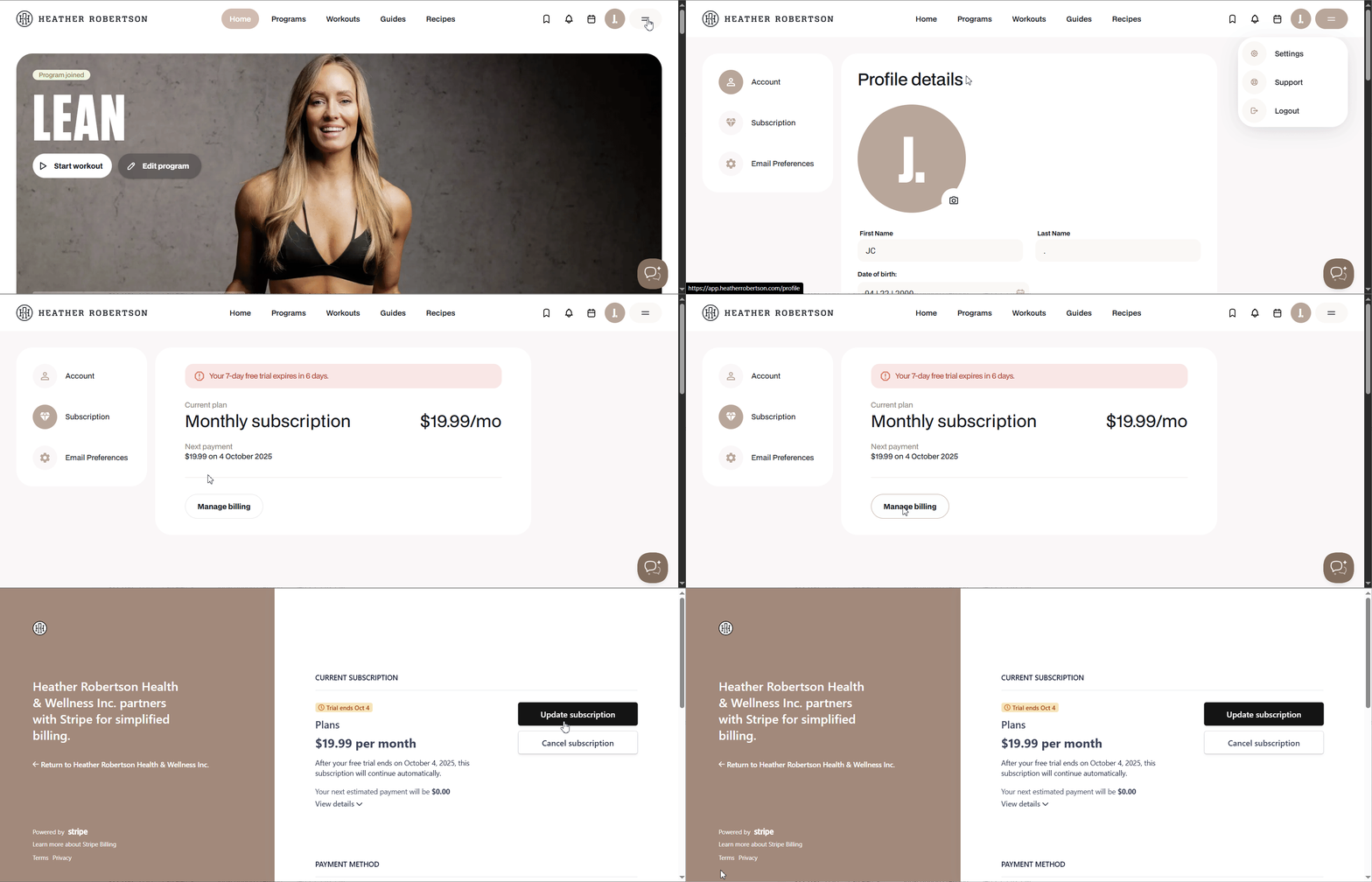
⚠️ Warning: If you change your subscription during the trial period, it will automatically end the trial and your updated subscription payment will be processed immediately
To view the remaining days in your free trial, select the main menu (=) > Settings > Subscriptions.
Updating your payment method
- From the main menu (=)
- Select Settings
- Select Subscription
- Select Manage billing
Here you will be able to update your payment method.

How to cancel your subscription
- From the main menu (=)
- Select Settings
- Select Subscription
- Select Manage billing
- Follow prompts to Cancel Subscription
You will maintain access until the end of your current billing cycle.
If you change your mind, come back to this menu to Reactive your subscription before your access ends.
What happens after you cancel
If you cancel during your free 7-day trial
There will be no payment charged. You will still have access to the app until the end of the trial period.
If you cancel during your monthly subscription
You will still have access to the app for the remainder of the month, but it will not auto-renew for the next month.
If you cancel during your annual subscription
You will still have access to the app for the remainder of the year, but it will not auto-renew the next year. There will not be a reimbursement.
⚠️ You will not maintain your current subscription pricing after cancelling. If you choose to join again in the future you will be offered the most current pricing.